OCLC Support

Can I use MarcEdit to convert xml files to mrc files?

Symptoms

I have a file of records saved in .xml that I need to change to .mrc, can I use the open-source MARC editing tool, MarcEdit?

Applies to

  • WorldShare Collection Manager
Resolution

MarcEdit is a freely downloadable application (open-source), downloads are available here https://marcedit.reeset.net/downloads

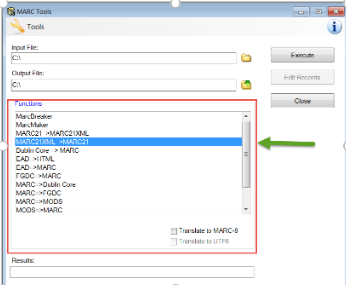
  1. Save the file to your computer.  From the MarcEdit home screen, click on Tools and then change the Functions section to "MARC21XML=>MARC21." Screenshot of the MarcEdit home screen    Screenshot of the MarcEdit interface
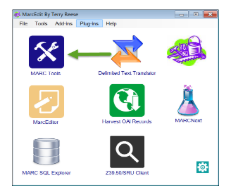
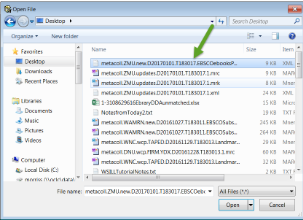
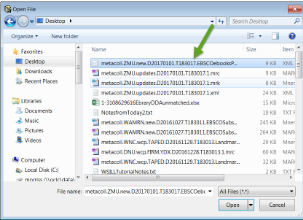
  2. Click on the folder icon next to the Input File box.  Select the XML file that you want to convert.                                                Screenshot of the File selector window   
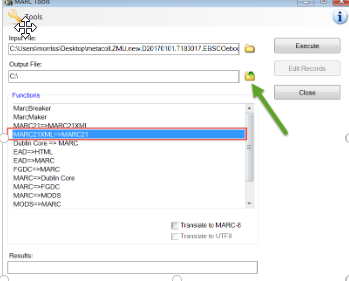
  3. Click on the folder icon next to the Output File.  From the resulting screen, choose where you would like to save this new file.  The file name should reflect ".mrc" in the specified box. Click Save                                                                                                                                                                                                                     Screenshot of the MarcEdit interface with a green arrow pointing to the Output File button                                                                                                                                                                               Screenshot of the MarcEdit interface with green arrows pointing to the File name and Save as type fields                                                                                               
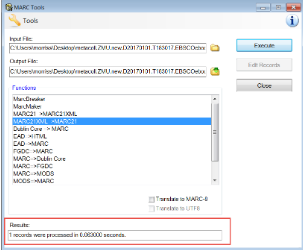
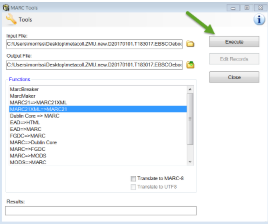
  4. Click Execute.  When this has completed, there will be information in the "Results:" section on the Tools screen.  This lets you know that the file has been processed and the new .mrc file should be saved in your specified location.                                                                                                                                                                      Screenshot of the MarcEdit interface with a green arrow pointing to the Execute button     Screenshot of the MarcEdit interface with the Results field surrounded by a red rectangle                                                                                    
  5. You can then close the Tools box and locate your .mrc file.                                                                                        Screenshot of the File viewer with a red rectangle around the .src file

 

Page ID
31165