
Introduction to OCLC Service Configuration for WMS users
Overview
OCLC Service Configuration harnesses your WorldCat Services account to tailor institution-specific details, while also allowing you to configure your OCLC products and services.
Visit the Get started guide to learn how to:
- Sign in to OCLC Service Configuration using your OCLC Services Account
- Verify or change your account information
- Add an institution to configure
- Add a Branch location in WMS
Service Configuration interface
Service Configuration is an administrative interface that allows you to configure and select settings for WorldCat Discovery, Metasearch Content, WorldShare Circulation, and manage your institution's WorldCat Registry profile.
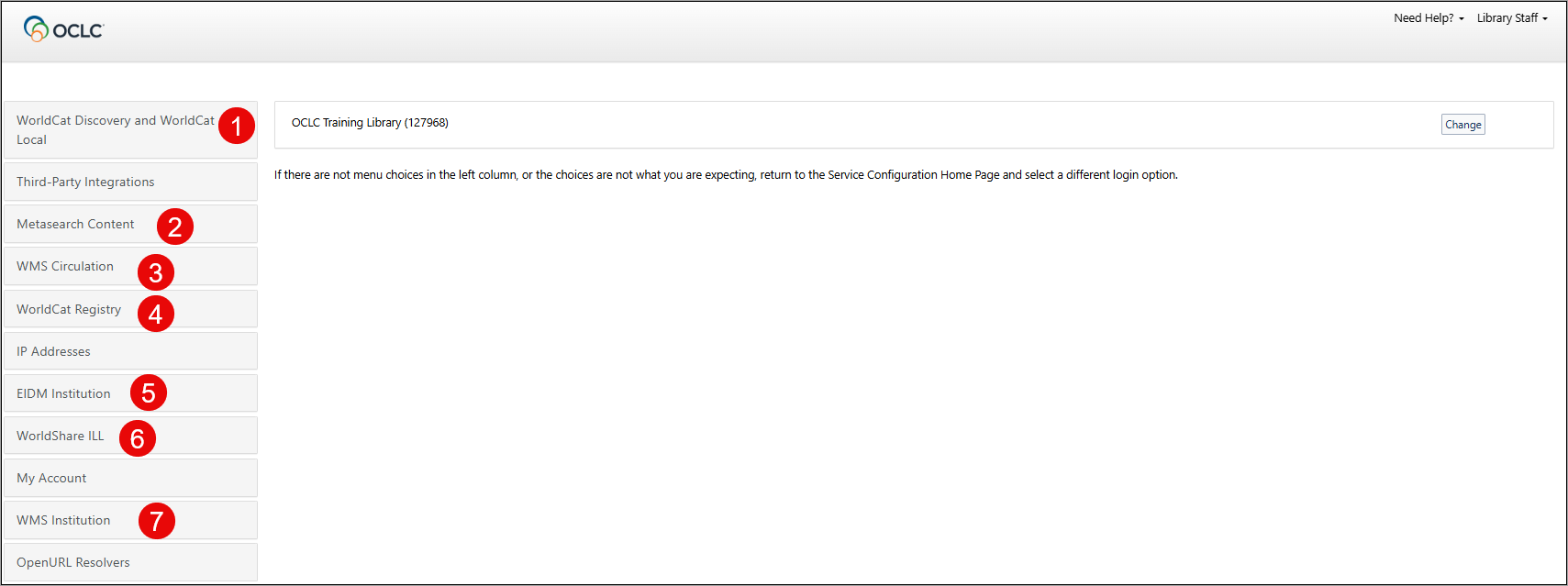
1. WorldCat Discovery and WorldCat Local
Click WorldCat Discovery and WorldCat Local in the left navigation to configure staff and patron-facing features for WorldCat Discovery.
| Module | Description |
|---|---|
| Search Settings | Customize the search defaults and the display of search results in WorldCat Discovery. |
| Item Detail Settings | Determine how item details display in WorldCat Discovery by customizing how data from MARC records, including local bibliographic data (LBD), displays to library users when they view item details information for records that appear in search results. |
| User Interface Options | Use this screen to update your banner, custom links, and display settings. Indicate if and where you would like to change the default settings. |
| Display Settings | Use this screen to set the Header/Footer settings, Citation style, WorldCat holdings audience levels access, Save search, Search alert, and Search history features in WorldCat Discovery. |
| Relevancy and Scoping | Configure the relevancy and scoping settings for WorldCat Discovery. |
| Full Text OpenURL Resolvers (outgoing requests) | Specify your OpenURL Resolvers for WorldCat Discovery. |
| Place Hold/Request Buttons | Configure your place hold and request buttons in WorldCat Discovery. |
| OPAC Statuses, Locations and Circulation Policies | Configure the OPAC statuses, locations, and circulation policies for WorldCat Discovery. |
| Holdings Codes & Shelving Location Messages | Configure holding codes and shelving location messages in WorldCat Discovery. |
| Local and Enhanced Content | Provide optional content to your end users in WorldCat Discovery. |
| Full Text and Open Access Links | Configure the appearance of full-text links in WorldCat Discovery. |
| ILS Support and Maintenance | Configure feedback and broken link report e-mail addresses in WorldCat Discovery. |
| A - Z List and OCLC Link Resolver | Find your base OpenURL for vendors and configure the default search behavior of your A to Z list in WorldCat Discovery. |
| Search Box Generator | The Search Box Generator enables libraries to construct and customize advanced WorldCat Discovery search boxes. |
2. Metasearch Content
Click MetaSearch Content in the left navigation to select and organize your default databases and licensed content that your users can search in WorldCat Discovery.
3. WMS Circulation
Click WMS Circulation in the left navigation to find administrative settings and to set your circulation policies for WorldShare Circulation. Settings and policies include:
| Module | Description |
|---|---|
| Patron Type Policy | Limit patron accounts based on items overdue, outstanding bills, waived bills, total value of loans, and/or items claimed lost, never had, or returned. |
| Collection Type Policy | Configure default item status, hold fulfillment availability, reshelving period, and in-processing status for items based on their location and material format. |
| Next-Generation Notifications | Create notifications to be automatically sent to your users in WorldShare Circulation. |
| Notifications and Receipts | Find information about legacy Notification Policies, Receipts, and Additional Patron Notifications. |
| Billing and Suspension | Set the Accruing fines policy, bill reasons, bill structures, payment methods, replacement costs, and UI tax policy. |
| Loans | Set your loan policies and long overdue and lost policies. |
| Holds and Schedules | Configure your hold and scheduling policies. |
| Admin/General | Configure your deleted items, display patron information, history, override credentials, and UI Preferences. |
| Integrations | Set up integration with POS printers, SIP2, ILL settings, and ASR Policy. |
| Groups | For WMS Groups, find settings related to group payment policy and hold fulfillment preferences. |
4. WorldCat Registry
Click WorldCat Registry in the left navigation to configure and maintain a profile that defines your institutional identity, to enable all web users to access your institution's services and relevant data for other OCLC products.
5. EIDM Institution
Use the EIDM Institution module to customize and translate the labels on your library's WMS Sign-in page and customize the Friendly name for your IdP list.
6. WorldShare Interlibrary Loan
Administrative settings for WorldShare Interlibrary Loan, Tipasa, and Resource Sharing for Groups are maintained in OCLC Service Configuration. In Service Configuration, you can set your interlibrary loan options, print settings, borrower and lender constant data, custom holdings groups, automations, and purchase options.
- Refer to WorldShare Interlibrary Loan Service Configuration settings.
- Refer to Tipasa Service Configuration settings.
- Refer to Resource Sharing for Groups Configuration settings.
For information on configuring the settings for My Account, refer to the My Account section of the OCLC Service Configuration.
7. WMS Institution
Set up your WMS library's institution borrower categories, patron custom data, and branch opening hours override settings in the WMS Institution module.
OCLC Support
For any queries not answered by this page or Service Configuration documentation and training, please contact OCLC Support.